- Role
- UI/UX Designer
- Timeline
- 2025–26
- Status
- Live product
- Tools
- Figma, FigJam
Akakçe
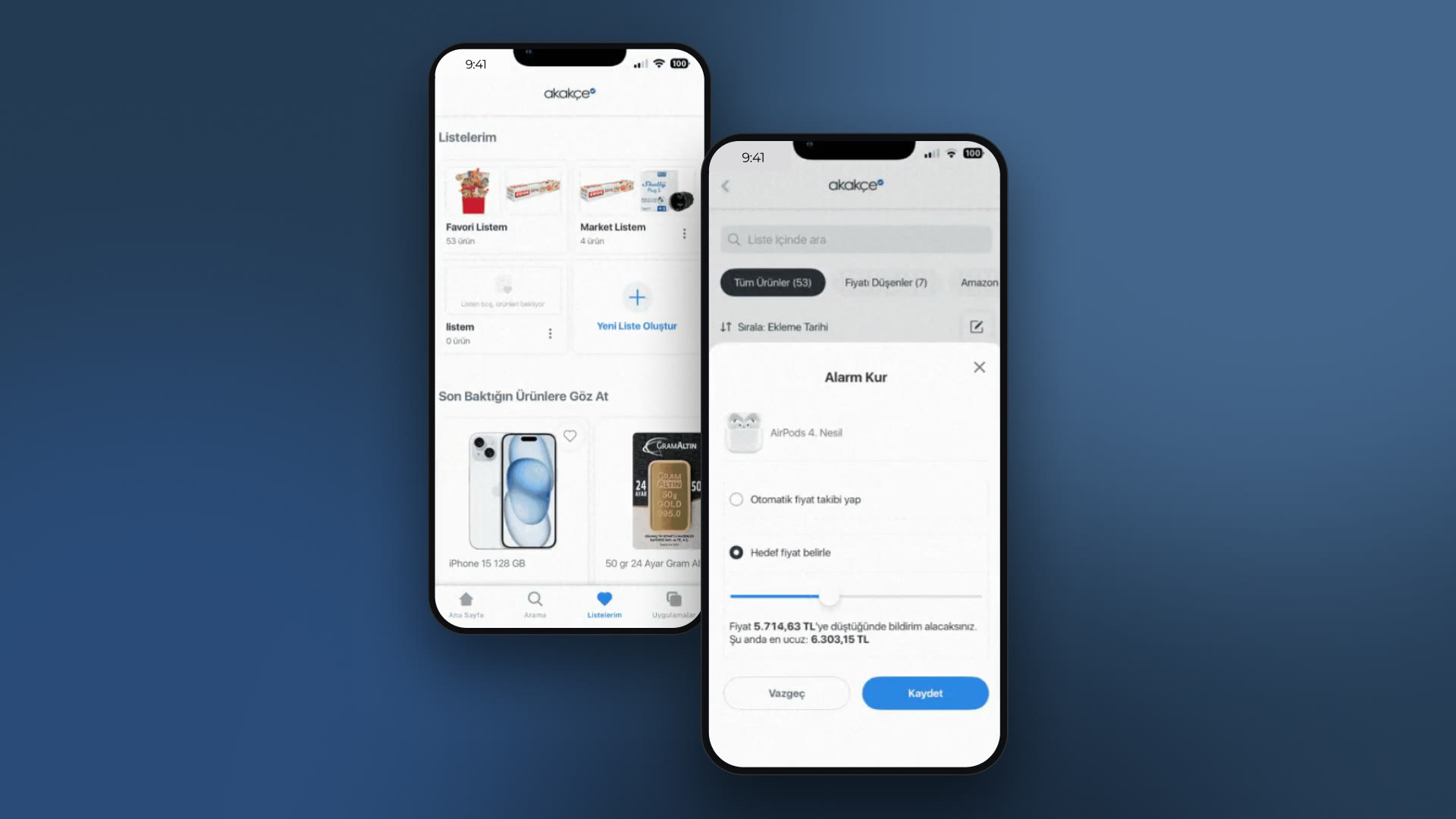
Favorites & Alert System Redesign
- Problem
- Favorites and price alerts were tangled together. People couldn't tell if they were saving a product or starting to track its price.
- My role
- I designed favorites, lists and price alerts across web and mobile: the benchmark, wireframes from rough to final, and the flows.
- I worked through the trade-offs with product managers and developers, and checked how it behaved after release.
- Outcome
- Live on web and mobile.
- Nilsu: one line on what changed for users (feedback, numbers) if you have it
One action shouldn't carry two intentions.
Overview
Two features sharing one button
Akakçe is one of Turkey's largest price comparison sites. You can add products to your favorites and get notified when the price drops. In the old flow those two things were mixed up: people couldn't tell whether they were saving a product or starting to track its price.
The job was to pull them apart into two flows that make sense on their own, behave the same on web and mobile, and still work for someone with a few favorites or a few hundred.
The goal
A clear line between favoriting and price alerts, with the same behavior on web and mobile. It had to grow from casual users to power users without getting harder to think about.
Scope
- Favorites and list management
- Creating and editing price alerts
- The same interactions on every platform
- Keeping people's place during onboarding
- Patterns that hold up with large product sets
Constraints
Not a blank canvas: favorites and alerts sat on a system that had been growing for years, with its own components and patterns. A full redesign was off the table, so the solution had to work within today's technical and design limits.
Problem
A favorite or a price alert? People couldn't tell, and some gave up
- One button did two different things.
- The same action gave different results on web and on mobile.
- Onboarding pulled people out of what they were doing, and they lost their place.
Research
First: how do other platforms handle it?
I looked at how marketplaces and price comparison sites set up favorites, lists and price alerts: where they keep them apart, where they mix them, and how they cope as the lists grow.
What kept coming up
- On most platforms a product can sit in more than one list.
- Default lists mean fewer decisions.
- Asking “which list?” up front makes people think harder.
- Editing lists after the action is more flexible.
- Favorites and alerts are often half tangled together.
Process
I worked out the structure before touching the visuals
I started with wireframe-level interaction models and only moved to high-fidelity screens once the structure held up. Four principles guided the decisions.
Separate mental models
Favoriting and price alerts are different intentions. Saving a product and subscribing to its price changes stay two separate actions.
Predictable interactions
The same action always leads to the same result. Nobody should have to guess what happens after a tap.
Design for scale
It has to work for casual and power users alike. A few items or hundreds should feel just as under control.
Default first, customize later
Fewer decisions in the moment. A default list makes saving quick; the advanced options come later.
What I explored
Early wireframes tried different ways to add products to lists, manage favorites and set price alerts, all inside the existing system. I compared several interaction models to cut decision fatigue and keep people's context, before moving to higher fidelity:
- When people should pick a list while favoriting
- Whether a price alert belongs during or after favoriting
- How lists and alerts can be managed without losing your place
- How defaults change the decision load as things scale
That narrowed it down to patterns that were clear, flexible enough, and possible within the system we had.
What changed
- Defaults, so there's less friction.
- Choosing a list moved out of the first favorite tap.
- Editing and managing follow one consistent pattern.
- Favorites and price alerts became two separate flows.
Solution
Separate flows for favorites and price alerts
Favoriting and price alerts became two independent flows. Favoriting is a single tap; editing lists and setting up an alert are optional next steps. A default list means fewer decisions up front, and power users can still move items between lists and manage several alerts.
Learnings
The biggest lesson was how much clearer you can make things while staying inside an existing system's limits. Splitting two look-alike actions into separate, predictable flows did most of the work: less to think about, more confidence. Iterating, keeping the teams aligned and leaning on data is what let it scale across platforms.
- Working within legacy constraints takes iteration.
- Web and mobile have to behave the same.
- Clearly separated actions are easier to think about.
- Structure comes before visual polish.
- Good defaults remove decisions.
- UX decisions have to fit the business logic.
Contact